Xbasic
{FONT}
IN THIS PAGE
Syntax
{FONT= Font_Name, Point_Size [, Style ] }
Arguments
- {font= }
Character. The leading {font= and trailing } characters are required.
- Font_Name
Character. The name of an installed type face. Case insensitive.
- Point_Size
Numeric. An integer value. Note that, unlike True Type and Postscript fonts, some built-in Windows fonts do not support all point sizes.
- Style
Character. Optional. Default = "" (normal) "b" = bold "i" = italic "u" = underline You may combine attributes, as in "bi" = bold italic.
Description
Defines the font, point size, and style.
You must not have any space characters in the finished command.
Discussion>
The {FONT} command defines the font, point size, and style. One or more {font=font_specification} statements may appear inside the Format section of a UI_DLG_BOX() function.
Example
ui_dlg_box("Disclaimer",<<%dlg%
{wrap=40}
{font= arial, 12, b }
Alpha Anywhere contains a powerful programming language called Xbasic. Xdialog is an
extension of Xbasic that allows you to create dialog boxes.;
{font=Arial,10}
<&Agree>  <&Disagree>
%dlg%)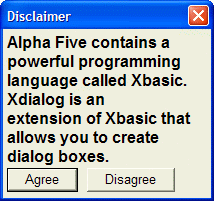
Limitations
Desktop applications only
See Also